Custom Resource Provisioning Portal
Introduction
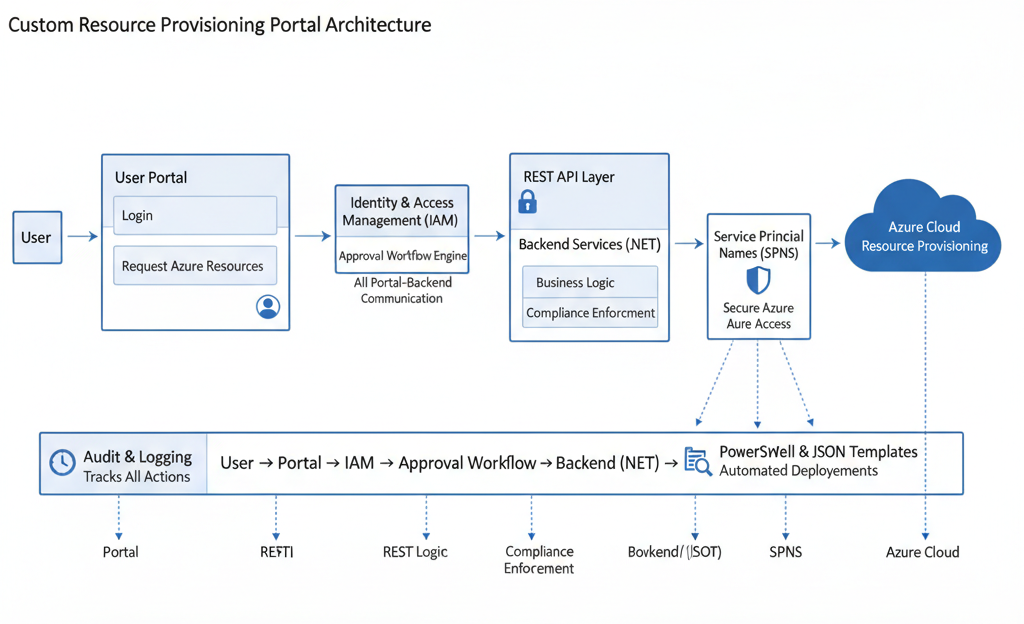
I led the development of a custom portal for an enterprise client, enabling users to securely log in and raise requests to provision, modify, or delete Azure resources. The portal enforced client-specific design, naming conventions, and configuration standards, ensuring compliance and operational consistency. Approval workflows were integrated, triggering resource deployment only after validation by the concerned team.
Project Description
Requirement Gathering: Collaborated closely with the client to capture business needs, technical requirements, and compliance standards.
Team Management: Oversaw developers and infrastructure specialists, ensuring seamless integration between frontend, backend, and Azure services.
Demo & Feedback: Conducted regular demos for stakeholders, incorporating feedback to refine the portal.
Key Components & Technologies
Security & Access Control
The portal restricted direct Azure access, granting permissions only as required by organizational policy. Resource requests were processed via REST APIs, ensuring secure and auditable deployments.
Project Challenges & Solutions
Problem: Preventing unauthorized Azure access while enabling self-service provisioning
Solution:
- Implemented granular IAM policies
- Used SPNs for secure, automated backend access
- Approval workflows for all change requests
Result: Zero unauthorized access incidents
Problem: Enforcing client-specific naming conventions and configurations
Solution:
- Automated validation of requests against standards
- JSON templates for consistent resource deployment
Result: 100% compliance with client standards
Problem: Ensuring user adoption and minimizing resistance
Solution:
- User-friendly interface
- Comprehensive training and support
- Iterative demos and feedback loops
Result: 92% user satisfaction score